
Grand Blue Tools
Reroll planner, fruit spawn notes, and other helpers that stay inside the rules.
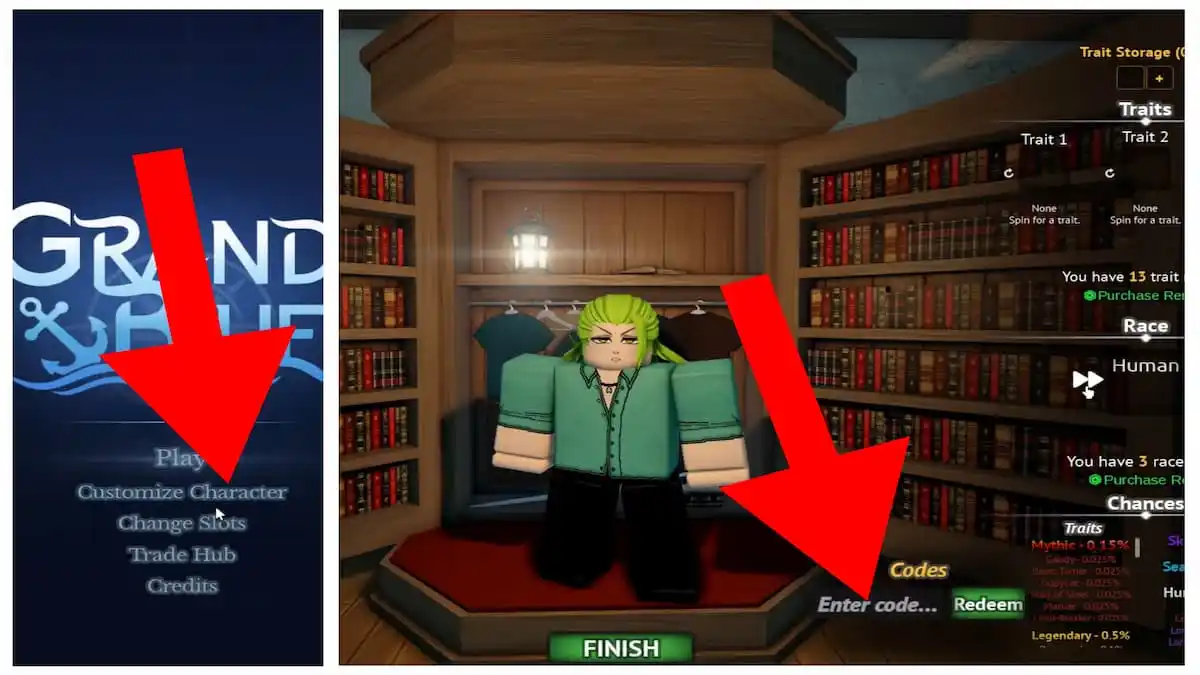
Grand Blue does not ship a companion app. The useful “tools” are checklists that sit next to Customize Character and the hourly plant clock. This hub collects them so you do not need a spreadsheet or a script.
- Reroll planner — the order to spend Release! without dumping Mythic 0.15% hunts into a fruit you will replace.
- Fruit spawn timer — how to run the official hourly plant rule without injecting ESP.
If you opened this hub looking for an auto-farm, go to scripts and then come back. These tools are the legal version.
Why a wiki page can be a tool
The wardrobe already shows Trait counts, Race arrows, and Chances. The world already spawns fruits every hour. The missing piece is decision order. Players fail by spinning Trait 1 before they have a fruit, or by sitting in a cave when the hour ticks. The two child pages are those decisions written as checklists you can keep on a second monitor.
They link back into:
What we will not add
- Damage calculators with fake numbers.
- Inventory dupers.
- Server hoppers.
- Anything that reads Roblox memory.
When Eternal Pose ships an in-game timer or a pity counter, we will point at that instead of this hub. Until then, a phone clock plus the reroll order is the whole kit.
How to use both tools in one session
- Title menu → Customize Character → redeem codes.
- Open the reroll planner and stop at the first checkbox you cannot tick.
- Press Play.
- Start a 60-minute timer as described on fruit spawn.
- Quest until it rings. Islands.
That is a better first hour than any GUI. If a patch changes the hour rule, the spawn page updates the same day as Early Access notes.
What a session looks like with both tools open
Keep Customize Character on one half of the screen only until FINISH. The reroll planner is a stop-the-line document: if a checkbox is false, you do not spin. After Play, the spawn page takes over. You are no longer allowed to open the wardrobe every time a camp drops a shirt. Traits do not improve because you stared at Mythic 0.15% between islands.
If you lose the phone timer, you have not lost the sea. Walk trees at the next round number and reset. That recovery step is written on the spawn page so this hub does not turn into a second copy of it.
Related
Beginner context sits in getting started. Combat once the timer rings sits in combat. Official Discord if you want a human instead of a checklist: links.
Frequently Asked Questions
Quick answers for Early Access pirates and marines.
Are these in-game tools?
They are checklists for systems the game already has: wardrobe rerolls and hourly plants.
Do I need a script to time fruit spawns?
No. Use a phone timer. The spawn tool explains when to start it.
Where should I spend Release! rerolls?
Follow the reroll planner: fruit plan, then Race, then Trait 1, then Trait 2.