
How to Redeem Grand Blue Codes
Title menu, wardrobe screen, Enter Code field, and common redeem errors.
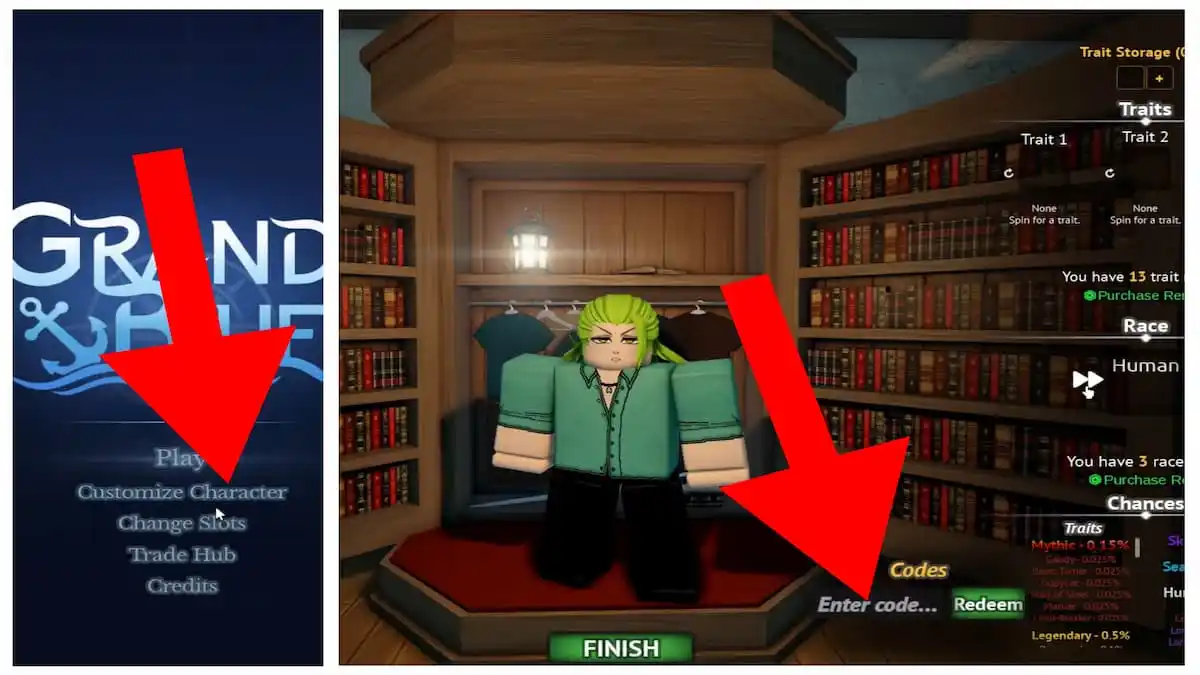
Grand Blue hides codes on the character wardrobe, not in a floating gift icon. If you mash Play and then hunt for a codes button in combat, you will miss Release! and TwitterGoalReached. This page is the click-by-click path, including the in-world Settings route some crews use after they already loaded an island.
Have the live list open in another tab: working codes. After you redeem, do not spin Traits yet. Spend order lives on trait and race rerolls.
Path A — Customize Character (primary)
This is the route most code trackers document, and it matches the official wardrobe UI.
- Launch Grand Blue [Early Access] from Roblox.
- Wait on the title menu. Do not press Play yet.
- Click Customize Character. The other title buttons are Play, Change Slots, Trade Hub, and Credits.
- You load into a library-style wardrobe: bookshelves, hanging shirts, a FINISH button at the bottom.
- Look at the lower-right of the screen. The Codes label sits above a text box that reads Enter code… next to a Redeem button.
- Paste one string. Press Redeem. Wait for the confirmation before you paste the next code.
- Press FINISH only after both live codes succeed.
The same wardrobe shows Trait Storage, Trait 1, Trait 2, Race (Human by default), and the Chances list. That is why codes live here: Trait and Race rerolls credit this screen, not your hotbar.
Path B — Settings after you are in-world
Some players report a gear icon at the top of the HUD with a Codes option and a Redeem a Code box. Use this if you already pressed Play and do not want to rejoin.
- Open the in-world settings / gear icon.
- Choose Codes.
- Paste into Redeem a Code.
- Confirm.
If that menu is missing on your client, you are not doing it wrong. Early Access UI still moves. Return to the title screen and use Path A.
What a successful redeem looks like
- Trait Rerolls increase the counter near You have X trait and the Purchase Rerolls prompt.
- Race Rerolls increase the counter near the Race row.
- A Fruit Chest from TwitterGoalReached goes to inventory or opens a chest UI. If nothing appears, rejoin once; Early Access inventory can lag.
Do not spam Redeem. Double-submit can look like a failed code when the first submit already consumed it.
When a code fails
Work the list in order before you assume expiry:
- Spelling.
Release!needs the exclamation mark.TwitterGoalReachedis one token, no spaces. - Stale server. Close Roblox fully and relaunch so you are not on a pre-patch instance.
- Already claimed. Codes are once per account, not once per slot. Change Slots will not give you a second Release!.
- Wrong game. Grand Blue is place 18335956021 by Eternal Pose. Other pirate Roblox games have their own code boxes.
- Expired. If the string is gone from codes hub, stop retrying.
After you redeem
Stay in Customize Character. This is the only time you can see Trait odds and Race without fighting. Read races and traits while the wardrobe is open. If you are about to pick Pirate or Marine, skim factions first. Combat starts the moment you press Play; the controls guide should already be in your head.
Fruit Chests are a different spend. Open them only after you understand drop rates on the cursed fruit tier list and chest prices on how to get cursed fruits. A launch chest is easy to waste on Cannon or Spin when you wanted Darkness.
Mobile versus PC
On PC, paste from this wiki. On mobile, long-press the Enter Code field and paste; Roblox on-screen keyboards love dropping the ! on Release!. If Redeem greys out, tap the field again and confirm the bang is there.
Server size is ten players. Codes are account-wide, so redeeming in a quiet server does not change rewards. It only changes whether the UI hitch from Early Access lags the confirmation toast.
Extra checklist
- Like the experience and join Eternal Pose anyway. Future codes may require it.
- Keep Discord open for the next string. Links sit on the links hub.
- If you use an executor to auto-fill the box, you are gambling a ban. Official policy is on script safety.
Redeem is a two-minute task. The rest of the wiki exists so those rerolls actually mean something.
Frequently Asked Questions
Quick answers for Early Access pirates and marines.
Where is the Grand Blue code box?
On the Customize Character wardrobe, bottom-right: Enter code... next to Redeem. Some clients also expose Settings → Codes after you press Play.
Why does Release! fail?
The exclamation mark is required. Mobile keyboards drop it. Also confirm you have not already claimed it on another slot.
Can I redeem on mobile?
Yes. Paste into Enter Code. Check that Release! still has the bang before you tap Redeem.
Do I redeem before or after Play?
Before. Stay on the title menu, open Customize Character, redeem, then press FINISH and Play.